This article was co-authored by wikiHow staff writer, Travis Boylls. Travis Boylls is a Technology Writer and Editor for wikiHow. Travis has experience writing technology-related articles, providing software customer service, and in graphic design. He specializes in Windows, macOS, Android, iOS, and Linux platforms. He studied graphic design at Pikes Peak Community College.
The wikiHow Tech Team also followed the article's instructions and verified that they work.
This article has been viewed 4,456,948 times.
Learn more...
In Windows, Alt key combined with numeric codes can access characters that aren't readily available on a normal keyboard. While Alt codes don't exist on Mac computers, there are a variety of Option key shortcuts that can let you type the most popular characters. On Linux, you can press Ctrl + Shift + U to type any Unicode character, as long as the font you're typing it in supports it.
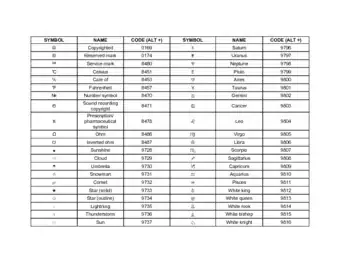
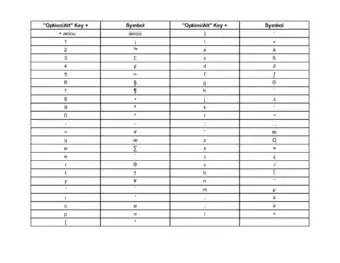
Alt Key Symbol Cheat Sheets

Steps
Using Windows
-
1Type currency symbols. Hold Alt and type the number below using the numeric pad on your keyboard. When you release Alt, the symbol will appear. NumLock must be enabled.[1]
Symbol Name Code € Euro
0128
£ Pound
156
¢ Cent
155
¥ Yen
157
ƒ Florin
159
¤ Currency
0164
-
2Type mathematics symbols. Hold Alt and type the number below using the numeric pad on your keyboard to insert mathematics symbols. When you release the Alt key, the symbol will appear. NumLock needs to be enabled.[2]
Symbol Name Code ÷ Division (Obelus)
246
× Multiplication
0215
± Plus or minus
0177
≈ Approximate
247
√ Square root
251
ⁿ Power n
252
² Squared
253
¼ Quarter
0188
½ Half
0189
¾ Three quarters
0190
∞ Infinity
236
≥ Greater than or equal
242
≤ Less than or equal
243
π Pi
227
° Degree
248
Advertisement -
3Type special punctuation and editing symbols. Hold Alt and use the numeric pad to enter the number below to create special punctuation symbols. When you let go of the Alt, the symbol will be inserted. NumLock must be enabled.[3]
Symbol Name Code ¡ Inverted exclamation
173
¿ Inverted question
168
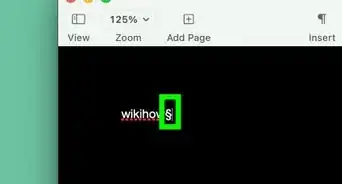
§ Section
21
¶ Paragraph
20
© Copyright
0169
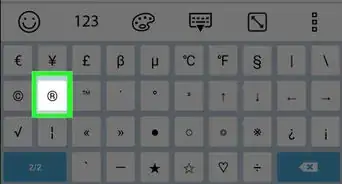
® Registered
0174
™ Trademark
0153
† Dagger
0134
‡ Double dagger
0135
– En dash
0150
— Em dash
0151
• Bullet
0149
-
4Type musical notation. Hold the Alt key and enter the number below using the numeric pad on your keyboard. When you release Alt, the musical symbol will appear. NumLock must be enabled for these to work. Symbols with codes between 9000 and 9999 rely on certain fonts, and may not work everywhere.
Symbol Name Code ♪ Quarter note
13
♫ Eighth note
14
♬ Sixteenth note
9836
♭ Flat
9837
♮ Natural
9838
♯ Sharp
9839
-
5Type other miscellaneous symbols. Hold Alt and type the number below with the numeric pad. When you release Alt, the symbol will appear. NumLock has to be on.[4]
Symbol Name Code ☺ Smiley
1
☻ Black Smiley
2
♥ Heart
3
♦ Diamond
4
♣ Club
5
♠ Spade
6
♂ Male
11
♀ Female
12
↑ Up arrow
24
↓ Down arrow
25
→ Right arrow
26
← Left arrow
27
☼ Sun
15
⌂ Home
127
Ω Ohms
234
Using Mac
-
1Type currency symbols. When you hold ⌥ Opt or ⇧ Shift+⌥ Opt, your keyboard keys will make different symbols than normal. This includes some of the more popular currency symbols. Use the shortcuts below to type different currency symbols.
Symbol Name Shortcut ¢ Cent
⌥ Opt+4
€ Euro
⇧ Shift+⌥ Opt+2
£ Pound
⌥ Opt+3
¥ Yen
⌥ Opt+Y
ƒ Florin
⌥ Opt+F
-
2Type mathematics symbols. Use ⌥ Opt or ⇧ Shift+⌥ Opt to modify the functions of your keyboard keys. Use the modifiers below to type different mathematics symbols.
Symbol Name Shortcut ÷ Division (Obelus)
⌥ Opt+/
± Plus or minus
⇧ Shift+⌥ Opt+=
° Degree
⇧ Shift+⌥ Opt+8
≥ Greater than or equal
⌥ Opt+>
≤ Less than or equal
⌥ Opt+<
π Pi
⌥ Opt+P
≈ Approximate
⌥ Opt+X
≠ Not equal
⌥ Opt+=
∞ Infinity
⌥ Opt+5
∫ Integral
⌥ Opt+B
Advertisement -
3Type special punctuation and editing symbols. The ⌥ Opt and ⇧ Shift+⌥ Opt modifiers will change the symbols your keyboard keys create. Some of these modified characters are punctuation and editing symbols. Use the key combinations below to type these symbols.
Symbol Name Shortcut ¿ Inverted question
⇧ Shift+⌥ Opt+?
¡ Inverted exclamation
⌥ Opt+1
© Copyright
⌥ Opt+G
® Registered
⌥ Opt+R
™ Trademark
⌥ Opt+2
¶ Paragraph
⌥ Opt+7
§ Section
⌥ Opt+6
• Bullet
⌥ Opt+8
– En dash
⌥ Opt+-
— Em dash
⇧ Shift+⌥ Opt+-
† Dagger
⌥ Opt+T
‡ Double dagger
⇧ Shift+⌥ Opt+7
-
4Use the Symbol Viewer to find more symbols. The Mac doesn't have as many codes as a Windows computer, but you can find lots of different symbols in the Symbol Viewer:[5]
- Click the Apple menu and select "System Preferences."
- Click the "Keyboard" option and then check "Show viewers for keyboard, emoji, and symbols in menu bar."
- Click the viewer icon that appears in the menu bar and select "Show Emoji & Symbols."
- Browse through the categories of symbols and double-click the one you want to insert.
Using Linux & Chromebook
-
1Press Ctrl+⇧ Shift+U. An underlined u will appear. This works on both Linux and Chromebook, which is based on Linux.
-
2Type the Unicode hex value of the character. You can look it up in a Unicode table and convert from decimal to hexadecimal if necessary. You don't have to type the zeroes at the beginning.
-
3Press ↵ Enter. The character should appear in place of the underlined u and the numbers.
-
4Type currency symbols. To type currency symbols on Linux and Chromebook, press Ctrl + Shift + U and then type one of the following Unicode hex values and press Enter to type currency symbols:
Symbol Name Code € Euro
20AC
£ Pound
00A3
₽ Ruble
20BD
$ Dollar
0024
₩ Won
20A9
¥ Yen
00A5
-
5Type mathematical symbols. To type mathmatic symbols on Linux and Chromebook, press Ctrl + Shift + U and then type one of the following Unicode hex values and press Enter to type mathmatic symbols:
Symbol Name Code ÷ Division Sign
00F7
× Multiplication Sign
00D7
± Plus Minus
00B1
≈ Approximately Equal To
2248
≠ Not Equal To
2260
∈ Is Element Of
2208
∉ Not Element Of
2209
∞ Infinity
221E
≤ Less Or Equal
2264
≥ Greater Or Equal
2265
π Pi
03C0
√ Square Root
221A
∛ Cube Root
221B
-
6Type special punctuation:
Symbol Name Code ¡ Inverted Exclamation Mark
00A1
¿ Inverted Question Mark
00BF
« Left Angle Quote
00AB
» Right Angle Quote
00BB
《 Left Angle Bracket
300A
》 Right Angle Bracket
300B
„ Low Left Cursive Quote
201E
“ Left Cursive Quote
201C
‰ Per Mille Sign
2030
– En Dash
2013
— Em Dash
2014
-
7Type common symbols. To type commonly used symbols on Linux and Chromebook, press Ctrl + Shift + U and then type one of the following Unicode hex values and press Enter to type the following symbols:
Symbol Name Code § Section
00A7
¶ Pilcrow / Paragraph Mark
00B6
© Copyright
00A9
® Registered
00AE
™ Trademark
2122
� Replacement Character
FFFD
⌘ Command Key
2318
-
8Type musical notation. To type musical notations on Linux and Chromebook, press Ctrl + Shift + U and then type one of the following Unicode hex values and press Enter to type music symbols:
Symbol Name Code ♩ Quarter Note
2669
♪ Eighth Note
266A
♫ Beamed Eighth Notes
266B
♬ Beamed Sixteenth Notes
266C
♭ Bemolle / Flat
266D
♮ Natural
266E
♯ Dièse / Sharp
266F
-
9Type Chess symbols. To type Chess symbols that represent Chess pieces on Linux and Chromebook, press Ctrl + Shift + U and then type one of the following Unicode hex values and press Enter to type Chess symbols:
Symbol Name Code Symbol Name Code ♔ White King
2654
♚
Black King
265A
♕ White Queen
2655
♛
Black Queen
265B
♖ White Rook
2656
♜
Black Rook
265C
♗ White Bishop
2657
♝
Black Bishop
265D
♘ White Knight
2658
♞
Black Knight
265E
♙ White Pawn
2659
♟
Black Pawn
265f
-
10Type arrows. To type text arrows on Linux and Chromebook, press Ctrl + Shift + U and then type one of the following Unicode hex values and press Enter to add arrows to your text:
Symbol Name Code ← Left Arrow
2190
↑ Up Arrow
2191
→ Right Arrow
2192
↓ Down Arrow
2193
↔ Left Right Arrow
2194
↕ Up Down Arrow
2195
↖ Diagonal Left Up Arrow
2196
↗ Diagonal Right Up Arrow
2197
↘ Diagonal Right Down Arrow
2198
↙ Diagonal Left Down Arrow
2199
↺ Counterclockwise Circle Arrow
21BA
↻ Clockwise Circle Arrow
21BB
-
11Type other miscellaneous symbols. To type the following miscellaneous symbols on Linux and Chromebook, press Ctrl + Shift + U and then type one of the following Unicode hex values and press Enter to type miscellaneous symbols:
Symbol Name Code ☺ Smiley
263A
☻ Black Smiley
263B
♥ Heart
2665
♦ Diamond
2666
♣ Club
2663
♀ Female
2640
♂ Male
2642
⚥ Male and Female
26A5
Community Q&A
-
QuestionWhy doesn't Alt+9773 make a hammer and sickle symbol?
 Community AnswerThe 9000 series of codes only work in certain fonts. Entering the code in Word will usually work, provided the font supports it. It may not work in your browser or other programs,.
 -
QuestionHow do I invert the "?" symbol?
 Community AnswerIf you are using a PC, you can type the inverted question mark by entering the ALT codes 0191, 6824, or 168 on your number pad. If you are on a Mac, you can enter the "¿" symbol by pressing "Shift" and "Option" simultaneously and then, without releasing, typing the "?" symbol.
 -
QuestionHow do I type the "@" symbol on a Spanish keyboard?Community AnswerBecause Spanish keyboards usually have accents where the @ symbol would normally be, you need to use a slightly different code. You can try the ALT code 64 for a PC, or you can type "Control" + "Shift" and then the key with the @ symbol printed on it.
Warnings
- Alt codes only work with programs that accept an ASCII input.⧼thumbs_response⧽

References
About This Article

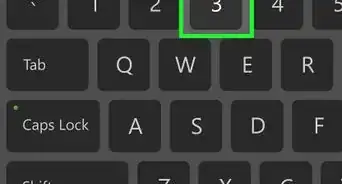
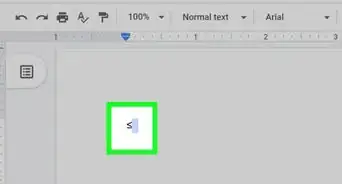
1. Enable NumLk (Number Lock) on the keyboard.
2. Hold the Alt key.
3. Enter the alt code number (e.g., 0128).
4. Lift your finger from the Alt key.